
Spatial Operations
Perform geometric, overlay, and data operations on your map features to create new shapes, clean topology, and filter datasets. Basic overlay operations use Turf.js, while advanced geometry operations are powered by mapshaper for topology-aware processing.
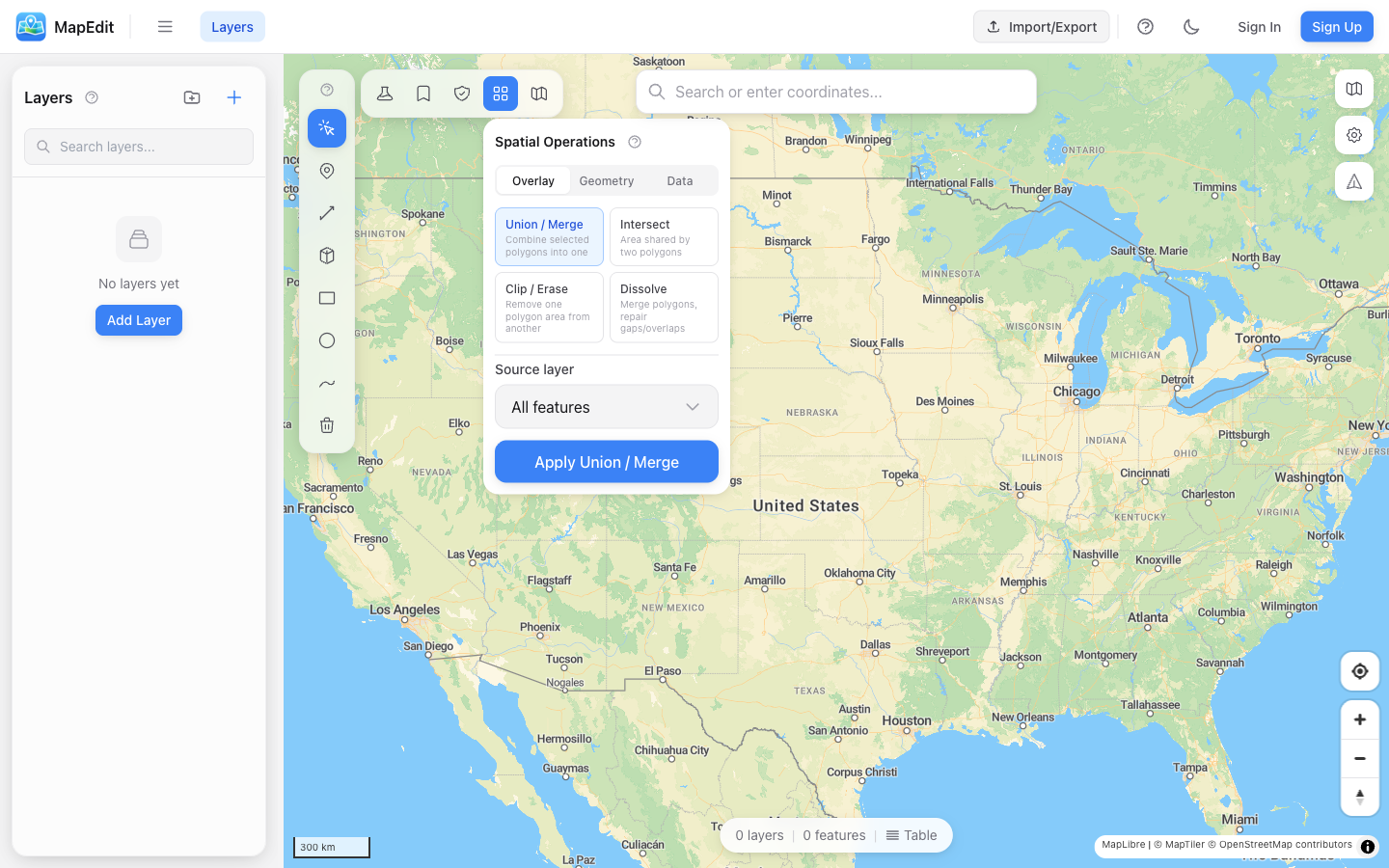
Available Operations
Operations are organized into three groups: Overlay, Geometry, and Data.
- Union / Merge — Combine selected polygons into one
- Intersect — Find the area shared by two polygons
- Clip / Erase — Remove one polygon area from another
- Dissolve — Merge polygons, repair gaps and overlaps
- Simplify — Topology-aware vertex reduction with algorithm choice
- Centroid — Convert polygons to center points
- Clean / Repair — Fix overlaps, gaps, and self-intersections
- Snap Vertices — Align nearby vertices within configurable tolerance
- Explode Multi-Parts — Split multi-geometries into individual features
- Interior Points — Points guaranteed inside polygons, better for labeling
- Extract Boundaries — Convert polygon boundaries to lines
- Split by Attribute — Create separate layers from property values
- Filter by Expression — Keep only features matching a condition
Union (Merge)
Combine multiple polygons into a single polygon, merging overlapping areas.
- Open Spatial Operations panel
- Select "Union / Merge" operation
- Choose the source layer with polygons to merge
- Click Apply
Intersect
Find the area where two polygon sets overlap. Each polygon in the source layer is tested against every polygon in the target layer.
- Open Spatial Operations panel
- Select "Intersect" operation
- Choose the source layer (first set of polygons)
- Choose the target layer (second set of polygons)
- Click Apply
Clip / Erase
Remove one polygon area from another (like a cookie cutter). Each source polygon is clipped by all target polygons.
- Open Spatial Operations panel
- Select "Clip / Erase" operation
- Choose the source layer (polygons to clip)
- Choose the target layer (the "cookie cutter")
- Click Apply
Dissolve
Merge all polygons in a layer into fewer polygons, removing internal boundaries. Now topology-aware via mapshaper, which repairs gaps and overlaps during the dissolve.
- Useful for creating outline boundaries
- Removes all internal divisions
- Handles overlapping and adjacent polygons
- Repairs gaps and overlaps during processing
Simplify
Reduce the number of vertices in complex geometries while maintaining shape. Powered by mapshaper for topology-aware simplification that prevents gaps between adjacent polygons.
- Choose between Visvalingam (smoother) or Douglas-Peucker (angular) algorithms
- Percentage slider controls how many vertices to keep
- Topology-aware: shared edges between polygons stay aligned
- Useful for large imported datasets that need to render faster
Centroid
Convert polygons to point features at their geometric centers using Turf.js.
- Creates one point per polygon
- Point is placed at the polygon's geometric center
- Original polygons remain unchanged
- Useful for labeling or point-based analysis
Clean / Repair
Fix common geometry issues in a single pass. Powered by mapshaper, this operation repairs overlaps, gaps, and self-intersections automatically.
- Fixes self-intersecting polygons
- Repairs gaps between adjacent polygons
- Resolves overlapping geometry
- Run this before other operations if you see unexpected results
Snap Vertices
Align nearby vertices within a configurable tolerance. Powered by mapshaper, this is useful for fixing small misalignments between features that should share edges.
- Configurable snap interval in degrees
- Aligns vertices that are close but not exactly coincident
- Helps fix slivers and gaps between polygons
- Use before dissolve or union for cleaner results
Explode Multi-Parts
Split MultiPolygon, MultiLineString, and MultiPoint features into individual single-part features. Powered by mapshaper.
- Converts MultiPolygon to separate Polygon features
- Converts MultiLineString to separate LineString features
- Converts MultiPoint to separate Point features
- Properties are copied to each resulting feature
Interior Points
Generate points that are guaranteed to be inside their source polygon. Unlike centroids, interior points always fall within the polygon boundary, making them better for labeling concave or irregular shapes. Powered by mapshaper.
- Points are always inside the polygon boundary
- Better than centroid for concave or L-shaped polygons
- Ideal for label placement
- One point per input polygon
Extract Boundaries
Convert polygon boundaries to line features. Powered by mapshaper, with an option to extract only shared boundaries between adjacent polygons.
- Converts polygon outlines to LineString features
- Option for shared boundaries only (inner edges)
- Useful for visualizing adjacency relationships
- Helpful for identifying shared borders between regions
Split by Attribute
Create separate layers based on the unique values of a property field. Each distinct value produces its own layer with the matching features.
- Select a source layer
- Choose the property field to split by
- Click Apply
- One new layer per unique value in the chosen field
- Layers are named after the field value
- Works with any feature type (points, lines, polygons)
Filter by Expression
Remove features that do not match a JavaScript expression. The expression is evaluated against each feature's properties.
- Select a source layer
- Enter a JavaScript expression (e.g., population > 10000)
- Click Apply
- Use property names directly in the expression
- Supports standard JavaScript comparison operators
- Creates a new layer with only the matching features
Output
All spatial operations create results in a new layer, preserving your original data. You can always undo the operation or delete the result layer if needed.